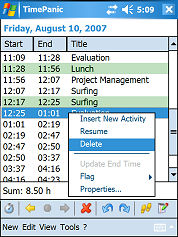
TimePanic is an award-winning application for tracking time spent at the computer. If you need to keep track of the work you do and when you do it, and want to stay on top of tracking projects or your business, then TimePanic is the ideal solution.
Features of TimePanic for Windows
Our time management software has a vast number of features designed to make it easier for you to take control of your time. Whether you need to keep track of time because you charge for it or simply want to increase your personal productivity, TimePanic is the time management software you're looking for.
Time Tracking Features
* Automatic logging of start time and end time.
* Continuous display of your current working time in the task bar.
* Day view and year view.
* Automatic opening of the current day protocol after restart.
* Commenting and categorization of activities by project, type and collaboration type.
* Sub-projects.
* Easy differentiation between chargeable and non-chargeable tasks.
* Configuration of image buttons as activity templates (favorites). Hence just one mouse click to start a new activity and to stop the previous one at the same time.
* Tracking of public holidays and days off (annual leave, sick leave, flextime).
* Specification of planned working hours and planned breaks.
* Calculation of overtime.
* Ease of adding or changing time tracking data later on.
* Printable reports (daily, weekly, monthly ...)
* Export in an Excel-compatible format.
* Custom flags for activities and days that can be used as filter criteria in reports.
* Configurable formats for date, time and duration.
* Calculates the quality of your working time according to Tom DeMarco and Timothy Lister.
* Sharing of projects and work types.
* Filters for reports, search functions.
* Support for hibernation and standby mode (automatically starts to a new day if necessary after waking).
* User-defined keyboard shortcuts (work even if TimePanic is in the background).
* Reminders with automatic pause detection.
General Features
* Multi-level undo and redo.
* Auto save of all changes.
* Can run in the notification area (system tray). It then displays your current working time in the tooltip of the tray icon.
* Setup and detailed user's guide. Upgrade from any previous version.
* Unicode and XML support.
* Demo data.
* Runs on USB drives.
Features of TimePanic for Pocket PC
TimePanic for Pocket PC is the little brother of TimePanic for Windows. Its key feature is automatic synchronization with TimePanic for Windows via ActiveSync (Windows 2000/XP) or the Windows Device Center (Windows Vista).
Time Tracking Features
* Automatic logging of start time and end time.
* Continuous display of your current working time.
* Easy differentiation between chargeable and non-chargeable tasks.
* Ease of adding or changing time tracking data later on.
* Configurable formats for date, time and duration.
General Features
* Synchronization with TimePanic for Windows (activities, projects, etc.)
* Multi-level undo and redo.
* Auto save of all changes.
* Setup and detailed user's guide (only available for Windows).
Like it? Share with your friends!
If you got an error while installing Themes, Software or Games, please, read FAQ.
Supported operating systems:
Pocket PC 2002, Windows Mobile 2003, Windows Mobile 5.0, Windows Mobile 6 Classic, Windows Mobile 6 Professional, Windows Mobile 6.1 Classic, Windows Mobile 6.1 Professional, Windows Mobile 6.5 Professional
Similar Software:
VibrateChime VibrateChime is vibration chime that you can select to have your device vibrate every 1, 5, 10, 15, 30 or 60 minutes
ComputersDefrag ComputersDefrag - This program allows you to keep track of the times when you defrag your computers. Select the computer and tap the button each time. The program sorts the computers by the higher date.
This program requires that you have both the 'BeanDLL.dll' file ** and ** the runtime files for Visual Basic on your PocketPC computer
BookCalendar BookCalendar - This program can be used to keep track of the book rentals (library) that you have out. Select the month/year to view the list. Tap on the day to display it fullscreen.
This program requires that you have both the 'BeanDLL.dll' file ** and ** the runtime files for Visual Basic on your PocketPC computer
CountdownTimer CountdownTimer - This program is a countdown timer.
This program requires that you have both the 'BeanDLL.dll' file ** and ** the runtime files for Visual Basic on your PocketPC computer. Simply unzip the file for your processor and place the DLL file in the 'Windows' folder of your PocketPC computer. For free support on installing email me
PocketX Wireless Bundle PocketX Wireless Bundle - By purchasing this bundle, you will save 20% off the total price of both applications!!
The bundle contains:
Pocket Stock Monitor 5 for Windows Mobile 6.5/6.1/6/5 and square screen devices
Photo Contacts 4 (Pocket PC Edition) for Windows Mobile 6.5/6
Agenda One Agenda One helps you keep on top of your schedule and stay in touch like never before when you're on the go.
From the moment you launch Agenda One, you'll see why it's different. Powerful, elegant, and amazingly easy to use... It just works
IndicatorTimer IndicatorTimer is a count down timer that displays the total time left in the upper right corner of the PocketPC Task bar. Select the minutes/hours and tap the start button to start the timer. The program will update the title bar with the time remaining once a second. The program also will sound an alarm when the time has run out
EggTimer (Pocket PC) EggTimer (Pocket PC) - A countdown timer with alarm for Windows Mobile.
Features a graphical, finger friendly timer that can be set for up to 1 hour. OpenGL based visual Dial so you can see from a bit farther away. At the end of the cycle, the buzzer will repeat until you press the Start button.
How To Use:
Set the time using the two Scroll Wheels on the bottom
TVLogs TVLogs - This program helps you to track the times when you watch TV. You can export the file to Pocket Word or IRDA it.
This program requires that you have both the 'BeanDLL.dll' file ** and ** the runtime files for Visual Basic on your PocketPC computer. Simply unzip the file for your processor and place the DLL file in the 'Windows' folder of your PocketPC computer
Comments on TimePanic:
Comments not found
If you noted an error or download link is broken, please, report it via this page or use comments.
Attention! TimePanic may be not compatible with your device HKC G801 (TechFaith Lampson II)