Platforms: iPhone, iPad, iPod Touch, Apple iPhone OS
Categories: System Utilities
Upload date: 22 Oct 12
Developer: mbpowertools
License: Freeware
Downloads: 73
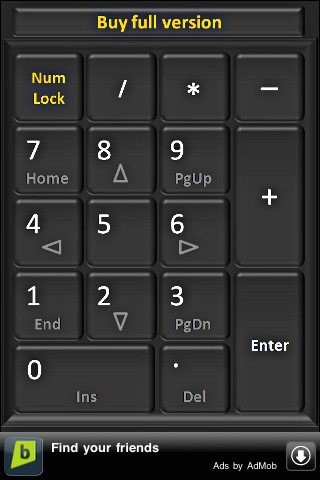
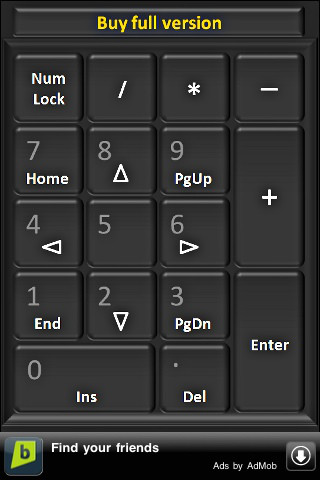
iNumKeyPadFree - iNumKeyPad turns your iPhone or iPod touch into a wireless numeric keypad for your PC or Mac. With it, you can easily enter large quantities of numbers in applications running on your computer.
In order to use the app, you need a local WiFi network connecting your PC or Mac to your iOS device. You also have to install the iReceiver application on your computer.
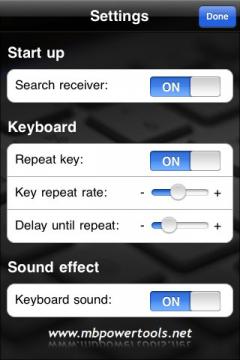
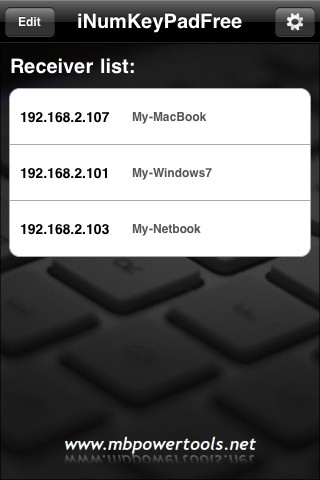
· Easy to use and setup - iNumKeyPad automatically searches for the receiver's IP address.
· No VNC server required - utilizes a popular and acclaimed receiver application.
· Supports Ad Hoc network.
· Adjustable key repeat delay and repeat rate.
What's New in This Release:
· Build to compatible with iOS4.
· iAd enabled.
Like it? Share with your friends!
If you got an error while installing Themes, Software or Games, please, read FAQ.
Supported operating systems:
Apple iOS 10.x (iPad), Apple iOS 10.x (iPhone), Apple iOS 11.x (iPad), Apple iOS 12.x (iPad), Apple iOS 12.x (iPhone), Apple iOS 5.0 (iPad), Apple iOS 5.0 (iPhone), Apple iOS 5.0 (iPod Touch), Apple iOS 6.0 (iPad), Apple iOS 6.0 (iPhone), Apple iOS 6.0 (iPod Touch), Apple iOS 7.0 (iPad), Apple iOS 7.0 (iPhone), Apple iOS 7.0 (iPod Touch), Apple iOS 8.x (iPad), Apple iOS 8.x (iPhone), Apple iOS 8.x (iPod Touch), Apple iOS 9.x (iPad), Apple iOS 9.x (iPhone), Apple iOS 9.x (iPod Touch)
Similar Software:
Funny Email Keyboard Funny Email Keyboard - Email Keyboards were not generally known to be a fun gadget... Until now.
You and your friends won't be able to stop laughing when using this application. It works exactly as a regular email keyboard with all its functions, but with a twist! Every time you press a key it produces a fun sound
Arabic Keyboard II for iPad Arabic Keyboard II for iPad - You can use this keyboard to type emails in ARABIC. As you may know the iPad doesn't come with a native Arabic Keyboard.
Since we included the "COPY" feature in this version you can also use it for:
· Web - Browser
· Notes
· and more...
You just need to paste the text in the app that you plan to use
Arabic Email Editor Arabic Email Editor - The comprehensive Email Keyboard for iPhone and iPod touch has arrived!
The Email Editor supports Auto Correct, Word Completion, Smart Speller, 50 graphics symbols and much much more.
Currently The Email Editor supports the following languages: English & Arabic
Military Keyboard II for iPad This simple yet helpful application works by playing the key you pressed every time you do, so you know which one you pressed without having to guess or reach for your glasses!
Czech Keyboard for iPad Czech Keyboard for iPad - You can use this keyboard to type emails in CZECH. As you may know the iPad doesn't come with a native CZECH Keyboard.
Since we included the "COPY" feature in this version you can also use it for:
· Web - Browser
· Notes
· and more...
You just need to paste the text in the application that you plan to use
Easy Typing Easy Typing How often do you find yourself constantly struggling to touch the right key even when you are just typing a short message on your iPhone or iPod Touch? The keyboard is just too small! With Easy Typing, struggle no more! The keys on the keyboard are double the size of the tiny one's of the iPhone
WiFi Touchpad HD WiFi Touchpad HD - This app allows you to use your iPad as a wireless touchpad and keyboard. With it, you can remotely control your computer from your iOS device.
In order to use WiFi Touchpad HD, you need a PC or Mac connected to the same WiFi network as your iPad. Also, you have to install the receiver application on your computer
Romanian Keyboard for iPad Romanian Keyboard for iPad - You can use this keyboard to type emails in ROMANIAN. As you may know the iPad doesn't come with a native ROMANIAN Keyboard.
Since we included the "COPY" feature in this version you can also use it for:
· Web - Browser
· Notes
· and more...
You just need to paste the text in the app that you plan to use
Norwegian Web Keyboard Norwegian Web Keyboard - Typing in Norwegian from your iPad has never been so simple! With this new application, you can now type in Norwegian "web" right from you iPad. It is a very simple application with the purpose to communicate everyone in the Norwegian speaking community
Other Software by developer «mbpowertools»:
mbPointerHD mbPointerHD - mbPointerHD allows you to remotely control PowerPoint presentations using your iPad. The app lets you move the cursor using the touchpad, add and erase annotations, easily change slides, and more.
To use mbPointerHD, you need a Windows or Mac running PowerPoint, and a local WiFi network connecting your computer to your iPad
mbDialer mbDialer - mbDialer is a speed dialing app with a simple and clean interface. The program shows 9 finger-friendly buttons on a page, each button being associated to a contact.
Every button can be configured to display a photo from the address book, camera or photo library, or stock icons
iNetFilesHD Free iNetFilesHD Free - iNetFilesHD allows you to access shared files stored on computers and NAS drives in your network from your iPad. The app lets you remotely manage files, play media and view documents.
iNetFilesHD is compatible with Windows XP, Windows Vista, Windows 7, Mac OS X Snow Leopard, and most NAS drives
Black & White Photo Black & White Photo - This app will transform your photos into artistic black & white pictures. After applying an image enhancement filter, the photo will look as if was shot using an old black & white camera.
The software can create black & white pictures directly from photos taken with your iPhone's camera
MyDeviceInfo MyDeviceInfo - MyDeviceInfo is a useful utility which shows detailed information about your iOS device.
System information displayed includes total and free memory, overall and unused storage space, battery level and charging status, device UDID, and active processes
mbDialerFree mbDialerFree - mbDialerFree is a speed dialing app with a simple and clean interface. The program shows 9 finger-friendly buttons on a page, each button being associated to a contact.
Every button can be configured to display a photo from the address book, camera or photo library, or stock icons
mbDriveHD mbDriveHD - mbDriveHD allows you to use your iPad as a wireless flash disk. You can store files in the internal memory of your mobile device the same way as you would on any other flash disk.
mbDriveHD has a built-in WebDav server, so you can map your iOS device as a remote folder on recent versions of Windows and OS X
WiFi Touchpad HD WiFi Touchpad HD - This app allows you to use your iPad as a wireless touchpad and keyboard. With it, you can remotely control your computer from your iOS device.
In order to use WiFi Touchpad HD, you need a PC or Mac connected to the same WiFi network as your iPad. Also, you have to install the receiver application on your computer
Photo2Go Photo2Go - Photo2Go is a quick way to share photos via email. Simply set up the recipient's email address and the subject and body of the email in advance, and the app will automatically send every picture you take to the entered address.
Prior to sending, Photo2Go can optimize the size of the image for faster transfer
mbPointer mbPointer - mbPointer allows you to remotely control PowerPoint presentations using your iPhone or iPod touch. The app lets you move the cursor by twisting and tilting your iOS device, add and erase annotations, easily change slides, and more