TapTapSMS - With TapTapSMS you can write your SMS much more easily than with any other way. You can write your message relatively fast (when you are used to it - it takes some time) with ONLY ONE FINGER (e.g. thumb).
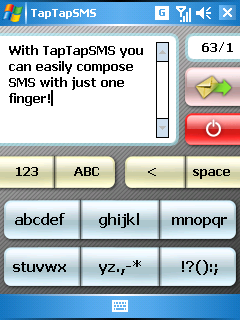
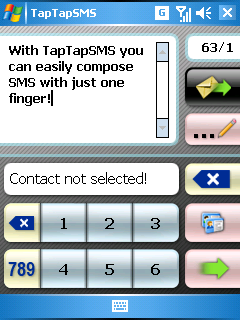
Now I will try to make clear TapTap layout. When you want to write on touch-screen with one hand and one finger (thumb) and don't want to concentrate on it (imagine when you are walking the street so you cannot&don't want to concentrate only on your PDA) you need REALLY BIG controls. But when you have big controls you haven't much space for other things like for the program you are writing in. So you want SMALLER keyboard what has BIG controls. And that is exactly what TapTap layout is all about.
TapTap is also adjusted for all people. You can train your thumb and write very fast but when you don't want or cannot write fast there is no problem TapTapSMS won't rush you. On standard GSM phones you must press button once (perfect state), twice or three times (sometimes even more times) to write desired char and it must be in time limit. In TapTapSMS there is no time limit so you can write how fast you want/can. Of course pressing real buttons is really different than pressing "nothing" on touch-screen. But on PDA you haven't real buttons - of course I mean PDAs without hardware phone keyboard (e.g. Asus P525) or big hardware keyboard like on Vario (by the way "Vario keyboard" is not very comfortable because you must use TWO hands and TWO fingers).
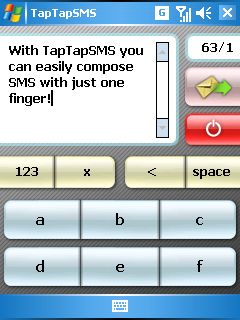
I tried to make this program as intuitive as I could but I must mention few details about the controls. To write SMS you must choose char group and then you can choose desired char to write. If you choose bad char group then tap on small "x" above main write buttons. You can freely move thru text with your cursor-key or with tapping to positions in text.
Like it? Share with your friends!
If you got an error while installing Themes, Software or Games, please, read FAQ.
Supported operating systems:
Windows Mobile 2003, Windows Mobile 5.0, Windows Mobile 6 Classic, Windows Mobile 6 Professional, Windows Mobile 6.1 Classic, Windows Mobile 6.1 Professional
Similar Software:
SportsSMSer SportsSMSer allows a score keeper at a game to send SMS alerts to a group of people each time a goal/score is made
SMS Voter SMS Voter is perfect for instant feedback via SMS for a range of activities including seminars, where to hang out with mates, Prize Draws etc... It collates votes sent from any SMS capable phone. SMS Voter is designed to manage adhoc SMS/Text based polls collating SMS Text votes sent from any phone capable of sending Text messages
AMT AMT automatically translates all your incoming messages (SMS, MMS, and E-Mail) to a target language of your choice. All you need to do is specify for which of the three types of messages you want translation enabled, and select the target language. AMT automatically monitors your Mobile devices' Inbox's for incoming messages
ContactingSMS ContactingSMS - ContactingSMS is a SMS sending app with quick contact picker. Tap 'Select Contact' button in the upper right corner to select a contact from your Pocket OutLook contacts and enter the text for the SMS message. When you tap the 'Send SMS' button the application will use the GSM network to send the SMS
PhoneMessage PhoneMessage - This program allows you to keep track of phone messages for up to 10 people. Then you can beam them to people that have the PocketPC PhoneMessages.
This program requires that you have both the 'BeanDLL.dll' file ** and ** the runtime files for Visual Basic on your PocketPC computer
easySMS easySMS - For easily sending SMS from your Pocket PC by infrared-connection or cable with your mobile
· Sending SMS with more than 160 characters (you can send a text which contains the length of 9 SMS) The text will be splitted at a "space", "hyphen" or a "carriage return" to separate SMS
Hotfix for resolving new SMS notifications not sounding while in standby mode for HTC Touch Diamond2 Hotfix for resolving new SMS notifications not sounding while in standby mode for HTC Touch Diamond2 - New SMS notifications will not sound unless you turn the device on from standby mode.
Copy the hotfix, which is an .exe file, to your device. To install the hotfix, tap the .exe file and follow the on-screen instructions
TwitterAlerterer TwitterAlerterer allows you to send Tweets/SMS alerts. When you send a tweet it is posted to Twitter.com and also a SMS is created with the tweet on your alert list. You can add/remove people from the list and make multiple list files. When you want to send an alert to all of the people on your list select 'Alert' from the toolbar
IBE Massive SMS Sender Massive SMS Sender is an application which can send massive SMS on the PC sync with some smart phone deivce
Other Software by developer «Ondrej Vavrousek»:
TapTap Keyboard TapTap Keyboard - This SIP (software keyboard) for Pocket PC devices is using new TapTap Technology I have developed especially for this project.
As you can see from the screenshots this SIP is not regular one like the others which are only making bigger controls