Categories: Multimedia & Graphics, System Utilities
Upload date: 25 Apr 11
Developer: P.Massimino
License: Shareware
Price: 8.00 $
Downloads: 627 File Size: 11761 Kb
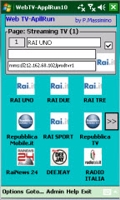
Web TV & Application Launch is optimized for device (handlends and phones) with screen resolution 240x320 pixels (e.g Dell Axim) or 240x400 pixels (e.g. Samsung Omnia). Of course it works in graphic environment with greater screen resolution . Compatible O.S. are PocketPC 2003 and Windows Mobile (all versions).
Based on screen device resolution, the program adjusts all its windows. It is possibile to use up to 126 buttons (14 pages 240x400 resolution) or 84 buttons (14 pages 240x320 resolution): the program automatically chooses better configuration.
Any button can have a specific title and icon. Button functions can be: synthonize video or audio streaming, run any program, run any data file, open folders and documents, open preferred Web sites, call phone number (if possibile) etc...
Streaming trasmission requires Internet bandwidth greater than 56kbs (WiFi, ADSL, 3G)
In the main page it is possibile todisplay preferred information (Buttons, Notes, GPS). Moreover it is possible to send SMS or e-Mail with own GPS coordinates and to display, by the browser, Google Maps of your area.
Like it? Share with your friends!
If you got an error while installing Themes, Software or Games, please, read FAQ.
Supported operating systems:
Windows Mobile 2003, Windows Mobile 5.0, Windows Mobile 6 Classic, Windows Mobile 6 Professional, Windows Mobile 6.1 Classic, Windows Mobile 6.1 Professional, Windows Mobile 6.5 Professional
Launcher Launcher is a Today screen add-on for Pocket PC's. It adds an icon bar, much like Windows's Quick Launch bar. You can place as many applications (screen space permitting) to it's list as you wish simply by copying link files into the Launcher folder, and launch the applications with one tap
WkTASK WkTASK shares features of both Task Manager and Program Launcher for Windows Mobile 5/6. You can switch all running programs smoothly like desktop Windows, and launch applications easily. Not only stylus operation but also key operation is available. Although the look & feel closely matches the theme color and make the 3D gradation, its CPU and memory usage are low
ShortcutFolderer ShortcutFolderer creates a Windows shortcut file for ALL of the files in the current selected folder. Use the file explorer to explore the folders and select the one with files. Select 'Create shortcuts' from the toolbar to create a Windows shortcut for ALL files in the folder
All U Need All U Need - After the app is downloaded and installed on your Windows phone ,when it it opened u can see two buttons i.e TOGGLE SWITCHES and MAIN TASKS.When u click TOGGLE SWITCHES u can see the wifi,alarm Shortcuts from here u can directly on and off the wifi and alarm,under the MAIN TASKS u can manage the phone ,webbrowser,sms,emails
Accelerometer Viewer This app is a very simple display for the raw accelerometer data coming from the device
TouchLaunch TouchLaunch is simple application launcher, which scans startmenu shortcuts, and list them alphabetically. This is very early alpha and my first program release
TouchFlo 2D Manilla TouchFlo 2D Manilla - A 2D remake of TouchFlo3D. Manilla2D (M2D) Disables any and all other Homescreen Plugins, just so you know. If Weather Graphics are missing, you are still using an older test Cab without all the graphics.
Video
Verified Devices:
ELVES
Polaris
Kaiser
Artemis
Hermes
NIKE
Herald
Trinity
etc list needs updating
Jmz Provisioning Jmz Provisioning - Select your carrier on first boot.
Release Notes:
* Leave app.dat file alone
Other Software by developer «P.Massimino»:
Astro Compass The program allows to use the Pocket PC like a real Compass. Put yourself in front to any celestial object and you will be able to find any correct geographical direction